Public technical tools and visual modules for DFIR investigations with operational clarity.
PowerForensics is a professional DFIR ecosystem that integrates collection, normalization, timeline analysis, and relational analysis to help turn technical evidence into coherent and defensible investigations. Designed for analysts, not for black boxes.
Public ecosystem architecture
1. PowerTriageCollection
2. ForgeNormalization
3. ChronosTimeline
4. NexusRelations
PowerForensics Ecosystem
PowerForensics groups tools aligned with different DFIR phases: collection, normalization, timeline analysis, and relational analysis.
PowerTriage Windows
Native PowerShell tooling for live triage and rapid artifact acquisition on Windows. Portable, dependency-free, and practical for direct execution, live response, or EDR/XDR workflows.
PowerTriage Linux
Standalone Bash tooling for fast triage on Linux systems. Extracts logs, sessions, connections, scheduled tasks, users, cronjobs, and persistence artifacts for later technical review.
PowerTriage IoT
Specialized tooling for IoT and embedded environments. Reviews configurations, authentication data, credentials, critical services, and other relevant elements in non-traditional infrastructures.
Forge
Conversion and normalization engine that turns evidence and logs into structures consumable by the ecosystem, ready for timeline work, correlation, and technical enrichment.
Chronos
Visual module focused on timeline reconstruction. Helps analysts order events, sequences, and relevant activity to add chronological context to an investigation.
Nexus
Graph-based relational module used to represent connections between entities, artifacts, systems, users, and events within an investigation.
Workflow
PowerForensics is designed to support different DFIR phases, from initial evidence acquisition to normalization, timeline reconstruction, and relational analysis.
Collect
Acquire relevant artifacts with PowerTriage on Windows, Linux, or IoT depending on the affected environment.
Normalize
Transform data and logs into consumable structures with Forge to simplify reading, filtering, and reuse.
Order
Reconstruct event sequences with Chronos to identify key moments, pivots, and transitions.
Relate
Explore connections between entities with Nexus to correlate users, systems, artifacts, and activity.
PowerTriage
Windows forensic triage, portable and deep
PowerTriage is a native PowerShell tool designed for Windows (10/11/Server) that collects and reviews key system artifacts without external dependencies and with low operational friction.
✔User, system, process, network, event, and browser coverage
✔Hashing and structured inventory for review and escalation
✔Useful execution even when admin rights are unavailable
✔Results prepared for later review in Chronos and Nexus
✔Portable, with no installation or external dependencies
PowerTriage Windows evolves continuously. Some capabilities are available publicly, while others remain in development, validation, or internal use before publication.
Standalone Bash tooling for rapid triage on Linux systems. Extracts logs, sessions, active connections, scheduled tasks, users, cronjobs, and persistence artifacts.
Highlighted features
✔Artifact extraction (logs, sessions, cron, users, and more)
✔MITRE ATT&CK mapping with relevant tactics and techniques
✔Structured export (JSON, CSV, HTML)
✔Compatible with offline review and mounted volumes
✔Results prepared for temporal and relational analysis
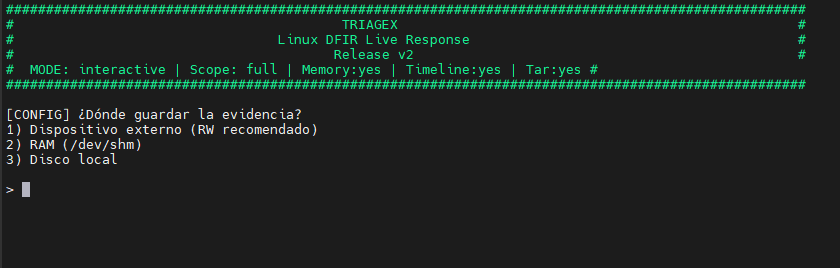
PowerTriage Linux execution on Linux (Bash)
PowerTriage IoT
Forensics on IoT devices and OpenWRT
Specialized version for embedded environments. Reviews configurations, credentials, critical services, and vulnerabilities with lightweight, reusable output.
Highlighted features
✔Support for embedded Python modules
✔Review of critical services, credentials, and configurations
✔Export in lightweight formats for auditing
✔Compatible with offline environments
✔Structured output ready for later analysis across the ecosystem
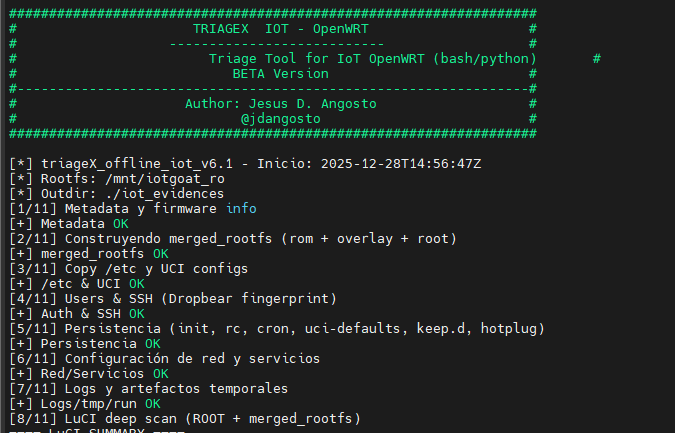
Review on IoT/OpenWRT devices
Documentation and demo
Explore guides, use cases, and execution examples across the PowerForensics ecosystem.